FEATURED ARTICLE

The Problem of Pain

Chronic pain affects over 1.5 billion people globally, with traditional medications often causing significant side effects. coMra therapy presents a safer alternative by combining laser therapy with magnetism, ultrasound, and…

Read this article
The Problem of Pain
Browse our blog and see all articles

Customer services

Our customer services team are seasoned practitioners of coMra therapy with over a decade of experience.

If you're considering a coMra device – but have questions not covered in our extensive Resources and FAQ pages – please send us an email and we'll get back to you soonest:

info@comra-therapy.com

User support

If you already own a coMra device and need help with your device, with your treatments – or with any technical issues – please reach out to us here.

Click through on the link below, send us an email and we'll get back to you:

support@comra-therapy.com

Schedule a call

If you'd rather speak with one of our experienced customer service team members, you can schedule a call with us instead.

Please click through on the Calendly link below and one of our customer service team will get back to you:

calendly.com/comra-support-team

Chat with us

Alternatively, our customer service team are on hand to answer your queries between 9:00–5:00 EST.

Please click through on the link below, or simply click the floating Chat icon on the bottom right of the screen.

Chat with customer services now!
CONTACT US

Get in touch with us

Have a question or need help? Send us a message and we'll get back to you as soon as possible.

WARRANTY

Register your coMra device!

If you recently purchased one of our coMra devices, welcome to the family! Please fill out the registration form below to activate your warranty.

How do I find my serial number? Found on the sticker on the back of your original product box.

Introducing the coMra Pro: Design and Features

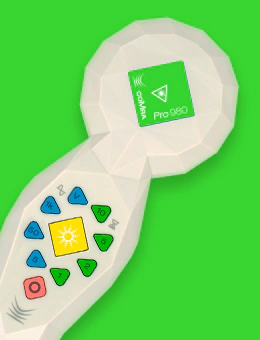
The coMra Pro is distinguished by its elegant, functional design. The device is housed in a sturdy, high-quality leather case, making it both protected and portable. Upon opening the case, you will find the coMra Pro unit alongside its USB-C charging cable, which connects to the port located at the base of the device.

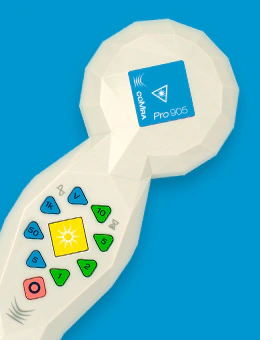
The coMra Pro is available in two distinct versions, identified by color-coded accents on the top of the terminal head: * The 905 nm version: Identified by a blue square on the terminal head and blue packaging. * The 980 nm version: Identified by a green flash on the terminal head and green packaging.

Operating the coMra Pro

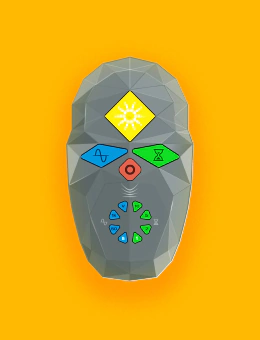
The coMra Pro is designed for simplicity and ease of use. To begin, slide the on/off switch located at the back of the device into the "on" position. Once powered, turn the device over and press the yellow start/stop button. By default, the device initiates at 5 Hz for a duration of 1 minute.

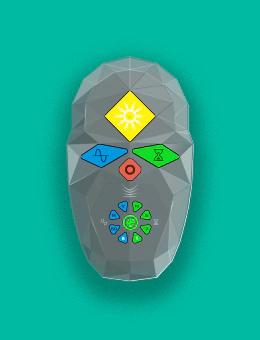
Users can easily customize these settings using the interface buttons: * Frequency (Left side): Options include 5 Hz, 50 Hz, 1,000 Hz, and a "Variable" setting, which provides a rapid cycling between different frequencies. * Time (Right side): Options include 1, 2, 5, and 10 minutes. * Function Button (Bottom): This button allows for the selection of various functions, including toggling between "Healing" and "Vitality" modes (the device defaults to Healing). It also allows for the adjustment of system settings, such as the volume of the audible beeps.

Once your desired settings are selected, press the start/stop button. A single beep confirms that the program has begun, and the start/stop light will begin to flash.

Understanding the Terminal Head

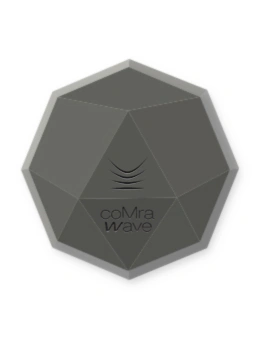
When the device is active, the LED lights on the terminal head flash in sequence. Positioned between these LEDs are the magnets within their protective casings. The low-level laser is located directly in the center; while the laser light may be visible through a camera lens, it remains invisible to the naked eye as it operates outside the normal range of human vision. Additionally, the blue dots on the terminal head indicate the covers for the ultrasound transducers, which are situated slightly beneath the surface.

Concluding a Session and Powering Down

When a program concludes, the coMra Pro emits two beeps and automatically switches itself off. If you wish to pause a program at any time, simply press the start/stop button. To terminate a program while it is running, press and hold the start/stop button for two seconds; two beeps will sound, and the device will cease the program.

To power down the unit completely, press and hold the start/stop button until you hear a long beep, indicating that the coMra Pro has powered down. Finally, return to the back of the device and slide the on/off switch into the "off" position.

The coMra Pro is a robust, user-friendly tool designed to support your health journey with ease and precision.